

The Hidden Cost of Keeping Notes Everywhere as an Online Teacher
At first, keeping notes everywhere doesn’t feel like a problem.
You jot things down in a notebook.
You leave comments in lesson slides.
You send yourself reminders in chat apps.
You trust that you’ll remember what mattered next time.
For many online teachers, this feels normal — even efficient.
But over time, scattered notes quietly make teaching harder than it needs to be.
Not because you’re disorganized. But because online teaching organization breaks down when information lives in too many places.
Why Scattered Notes Feel Fine at First
Most online ESL teachers don’t choose to keep notes everywhere. It happens gradually.
A quick reminder in Zoom chat.
A sentence saved in a Google Doc.
A comment in a lesson file.
A message thread with a parent.
At the beginning, this works — especially with a small number of students.
But as your teaching load grows, those small notes turn into:
- Fragmented student context
- Repeated decisions
- Mental “catch-up” before every lesson
That’s when online teaching starts to feel mentally heavy.
What “Keeping Notes Everywhere” Actually Costs Teachers
The real cost of scattered notes isn’t time — it’s cognitive load.
When information is spread across tools, teachers spend energy:
- Reconstructing what happened last lesson
- Remembering where notes were saveda
- Checking homework notes and parent feedback to see where you left off
- Deciding what matters and what doesn’t
- Filling gaps from memory
This often shows up as:
- Slower lesson starts
- Hesitation during live teaching
- Over-explaining or under-challenging
- Constant second-guessing
Even experienced teachers feel this strain.
Not because they lack skill — but because online teaching organization relies too heavily on memory when notes aren’t centralized.
Why Memory-Based Teaching Breaks Down Online
In face-to-face classrooms, memory is supported by:
- Physical routines
- Shared space
- Visual cues
Online teaching removes many of those supports.
Instead, teachers juggle:
- Multiple platforms
- Changing student schedules
- Short lesson windows
- Live pacing decisions
When lesson notes, student progress, and feedback are scattered, teachers are forced to hold the system in their heads.
And that’s not sustainable.
What This Looks Like in Real Life
For a long time, I did exactly what most online teachers do.
I started by keeping student notes in a Google spreadsheet — one tab per student. It worked at first. But as my student list grew, finding the right tab during lessons became slow and stressful. Eventually, I was always behind.
So I built a detailed system in Notion. It solved the problem of finding students, but it introduced new gaps. I still had to remember:
- What lesson came next
- Which resources to send
- What feedback I’d already given
Then I signed up for SuperTeacher, which I still love for selling packages, tracking class credits, and processing payments. I started sending feedback to parents there and leaving a note about which lesson I taught.
But now my information was split again.
Some students lived in Notion.
Some lived in SuperTeacher.
Resources still had to be sent manually through WeChat — flashcards, workbooks, lesson previews.
Nothing was wrong.
But everything required effort.
That’s when I realized the real issue wasn’t the tools — it was fragmentation.
The Shift That Changed Everything
When I designed the Teacher Hub, the goal wasn’t to add another tool.
It was to create a system where I could open and teach. The Teacher Hub exists to support better online teaching organization by holding student context, progress, and planning decisions in one place — so teachers don’t have to.
This is what that looks like in practice.
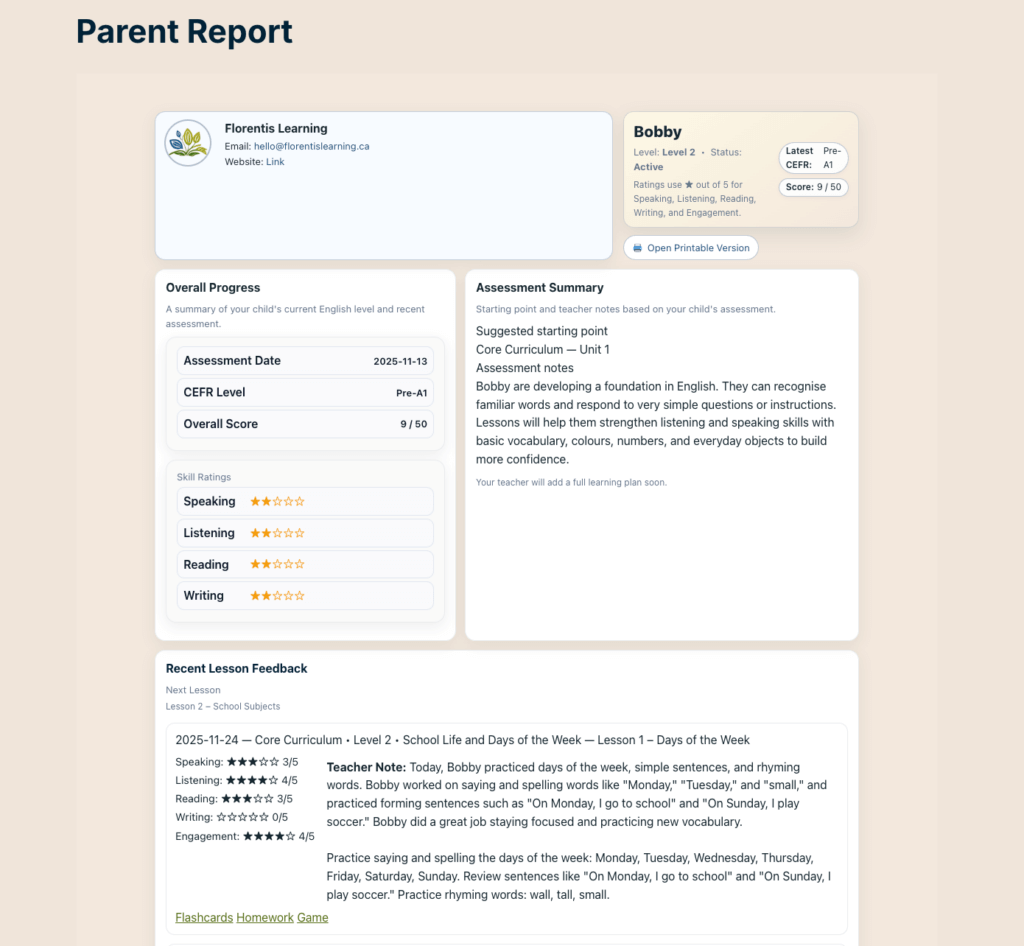
The Teacher Hub:
- Remembers what lesson comes next
- Automatically provides parents with the correct worksheets, flashcards, workbooks, and lesson previews
- Uses lesson-based feedback templates so I’m not rewriting comments for every student
- Makes student progress visible instead of assumed
Feedback for parents became clearer.
Practice resources were shared consistently.
Tracking progress became easier.
And most importantly — I stopped carrying everything in my head.
That’s when teaching started to feel lighter.
What Changes When Everything Lives in One Place
When student notes, lesson history, and next steps live in one place:
- Lesson transitions feel smoother
- Planning takes less time
- Decisions happen faster
- Teaching feels calmer
You’re no longer rebuilding context every session. You’re continuing a conversation that already exists.
This doesn’t require more effort. It requires better online teaching organization.
Where Teacher Organization Tools Actually Help
Teacher organization tools are most effective when they:
- Centralize lesson notes
- Track student progress over time
- Reduce repetition
- Support decisions during live lessons
For a deeper look at online ESL teaching tools that consolidate lesson records, placement data, and parent communication, Florentis breaks this down in more detail in this guide: Online ESL Teaching Tools: Organize Your Back Office with the Teacher Hub.
That article focuses on the how. This post focuses on the why.
Simple Organization Shifts That Help Immediately
Even before adopting new tools, small changes can reduce overload:
- Choose one primary place for student notes
- Use consistent labels or naming conventions
- Review notes briefly before each lesson
- Avoid duplicating the same information across platforms
These won’t solve everything — but they reduce friction right away.
And they make it easier to move toward a complete online teaching organization system later.
Teaching Feels Lighter When You’re Not Holding Everything Alone
If teaching has felt mentally exhausting lately, it’s not because you’re doing something wrong.
It’s because:
- Information is scattered
- Context has to be rebuilt
- Decisions rely too heavily on memory
When everything lives in one place, teaching changes.
Not because you care less —
but because your system is doing some of the work with you.
👉 See what changes when everything lives in one place
Explore how the Teacher Hub supports online teaching organization without adding more to manage.
Frequently Asked Questions About Online Teaching Organization
Why is online teaching harder than in-person teaching?
Online teaching lacks physical cues and shared space, so teachers rely more heavily on notes, systems, and digital tools to maintain continuity.
Is keeping digital notes enough for organization?
Digital notes help, but without structure and connection, teachers still have to piece information together manually during lessons.
Do teacher organization tools replace experience?
No. They support experience by reducing cognitive load and helping teachers make clearer decisions during live lessons.
Leave a Reply