

If juggling lesson notes, placement levels, homework links, and parent updates feels like a second job, there is a simpler way. The Florentis Teacher Hub brings student management, lesson records, placement assessments, and professional parent reports into one tidy dashboard. For teachers looking for reliable online ESL teaching tools for teachers, this hub cuts the busywork so you can focus on teaching.
Why one dashboard changes everything
Most teachers spend more time hunting for what they recorded last week than planning a lesson. The Teacher Hub eliminates that friction by keeping every student’s history visible in one place: past lessons, last assessment, flashcards and workbook links, and a shareable parent report link that requires no login.
“The seven starter questions on page one of the placement assessment give me a clear level fast. I even realized two of our students were placed too low. And then the hub helped me level them up confidently.”
Core features at a glance
- Fast student setup: add a student with just a name and optional details like age or level.
- Instant parent reports: share a single link with parents so they can see assessments and recent lesson feedback without creating accounts.
- Lesson recording: prefilled feedback and auto-attached resources such as flashcards, workbook pages, and games.
- Placement assessments: prefill CEFR level, course, and suggested feedback after you enter a score.
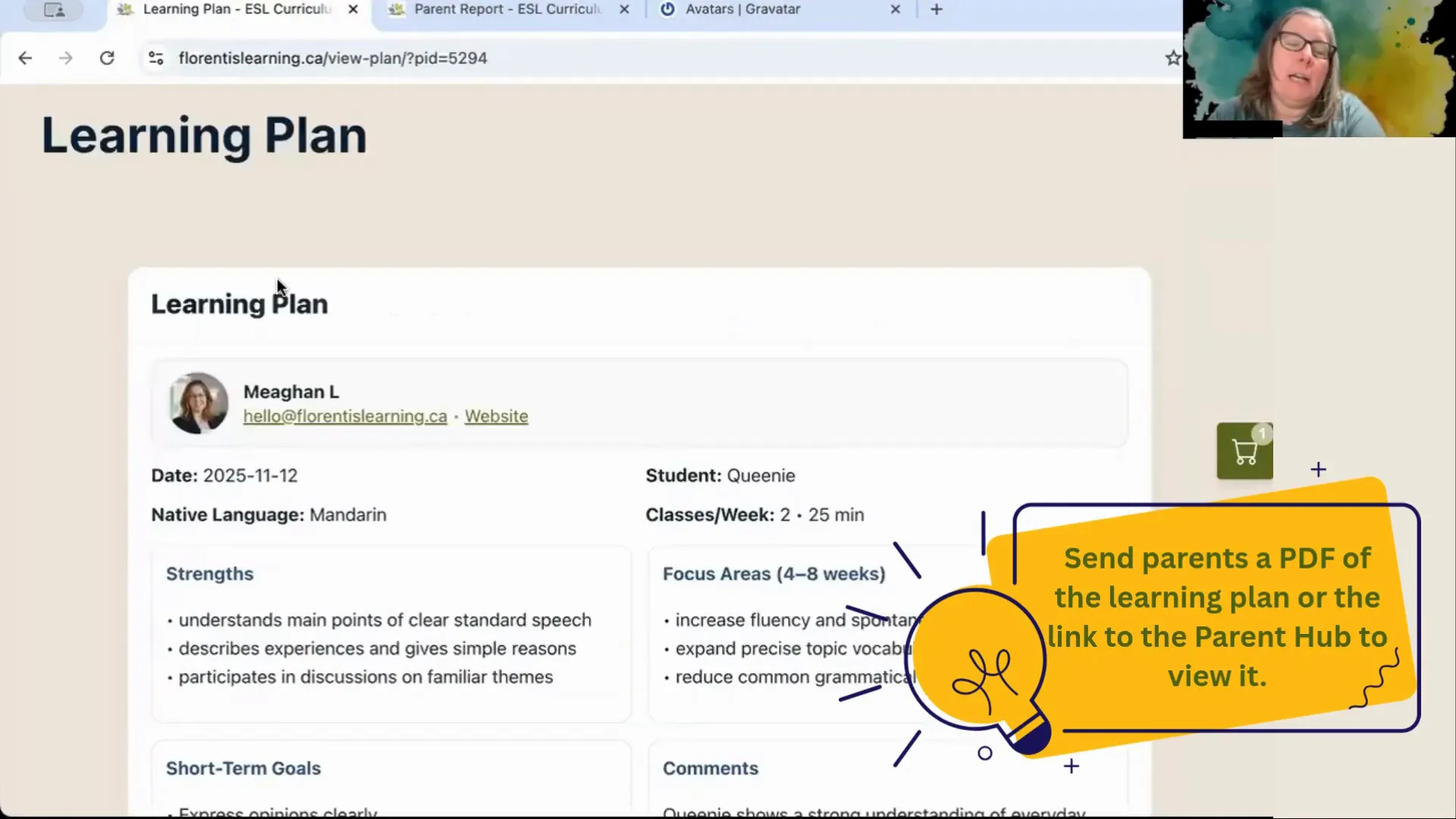
- Printable learning plans: create and export a clean plan to send to parents or keep for your records.
- Automation: templates and smart defaults to speed up recurring tasks.
Quick tour: set up students and your teacher profile
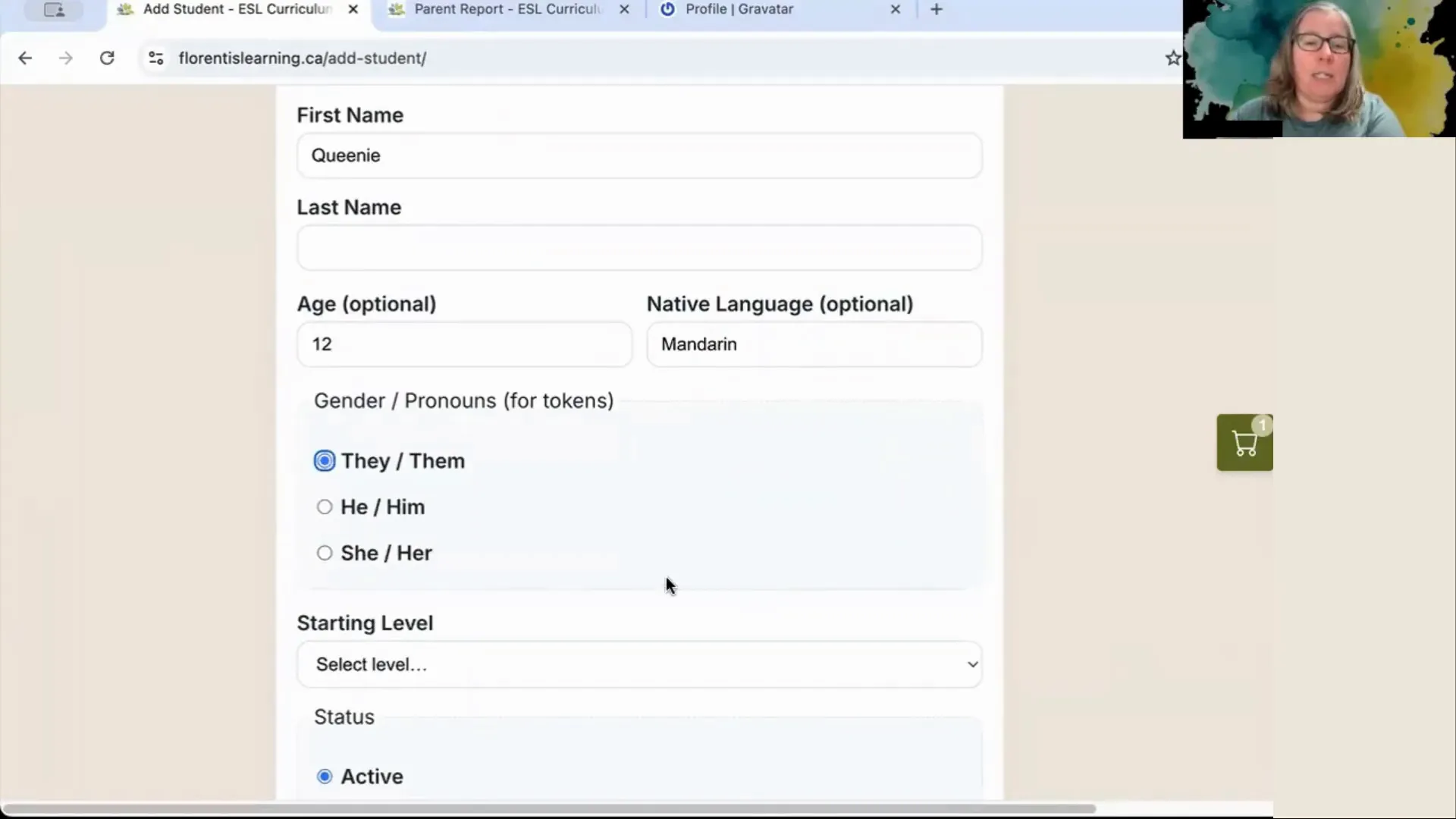
Adding a student takes seconds. Name is the only required field; last name, age, native language, and starting level are optional. You can toggle a student between active and inactive so your dashboard stays tidy.
Personalize the parent report by adding your name, booking link, and a profile photo. The parent view shows your photo, contact link, assessment summary, and the date of the most recent learning plan. Parents can print the report or click your booking link without logging in.
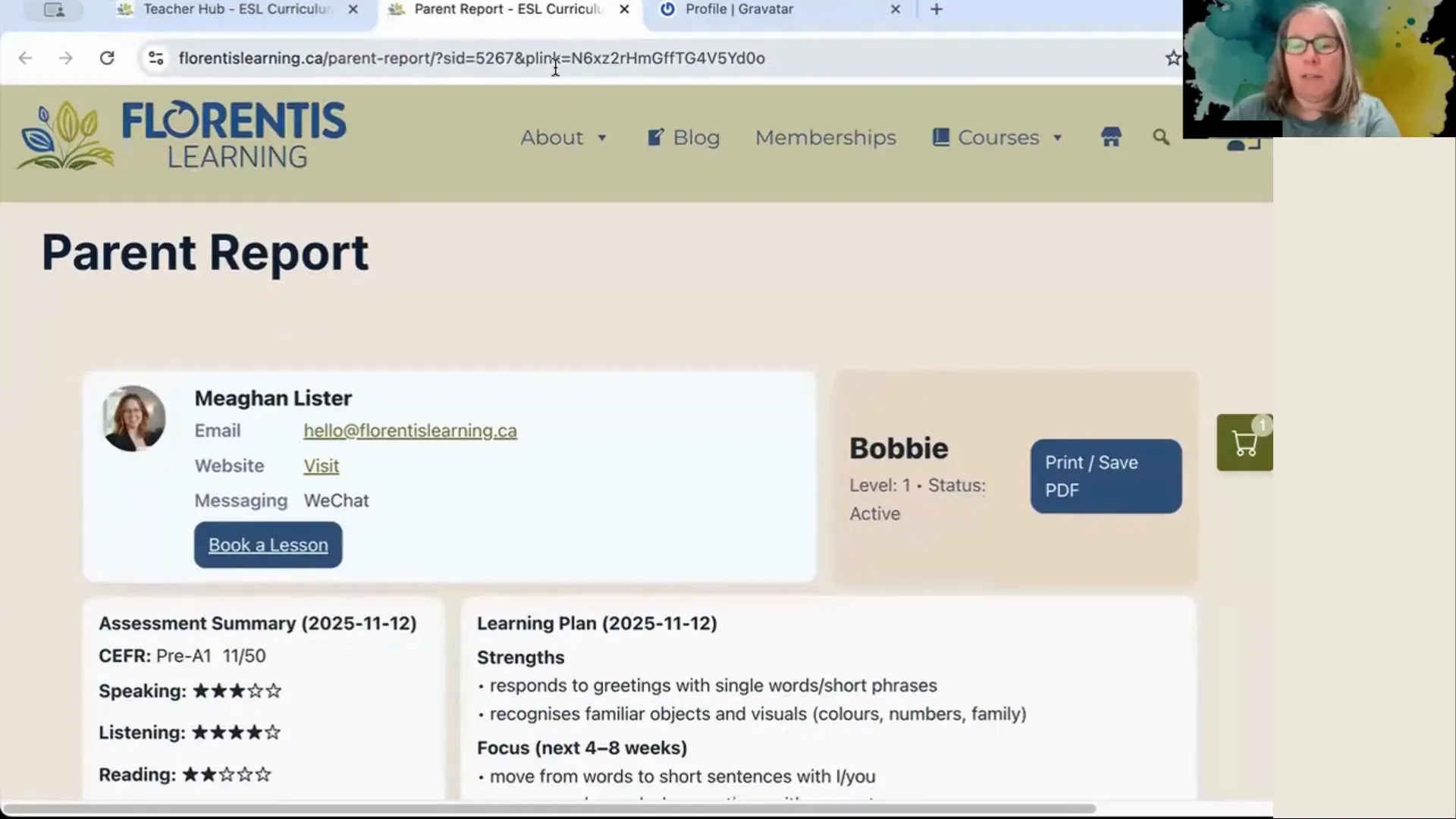
To add or change your photo quickly, use Gravatar with the email you registered. The hub pulls the image from your WordPress/Gravatar profile, so once uploaded it will show up on your dashboard and parent reports.

Record lessons in under a minute
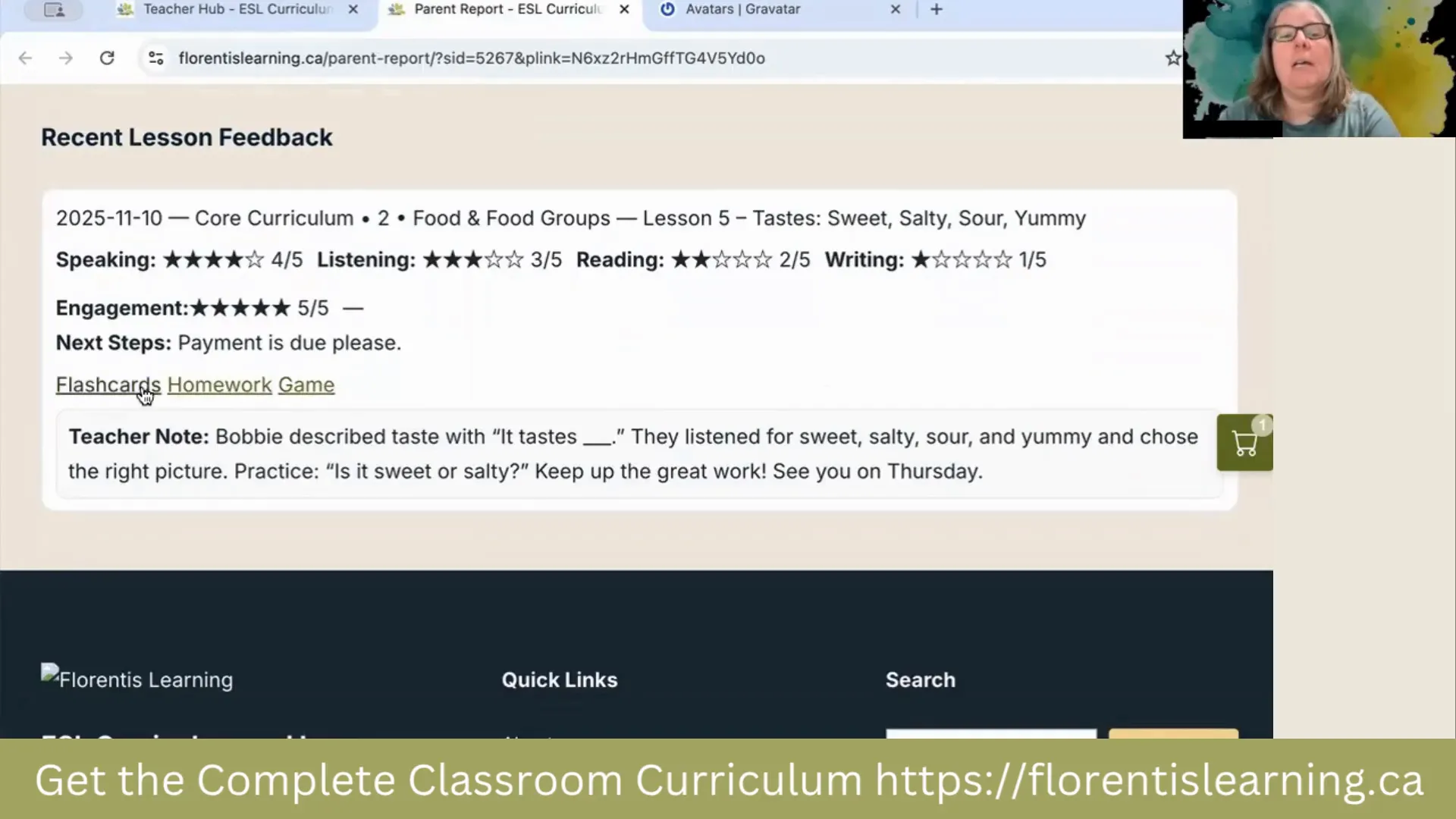
Recording a lesson is streamlined. Pick the student, select the lesson from your curriculum, adjust an automatically generated feedback comment if needed, rate performance, add a date, and save. If resources exist for that lesson, the hub auto-attaches flashcards, workbook pages, and vocabulary games so parents see exactly what students practiced and can follow up at home.
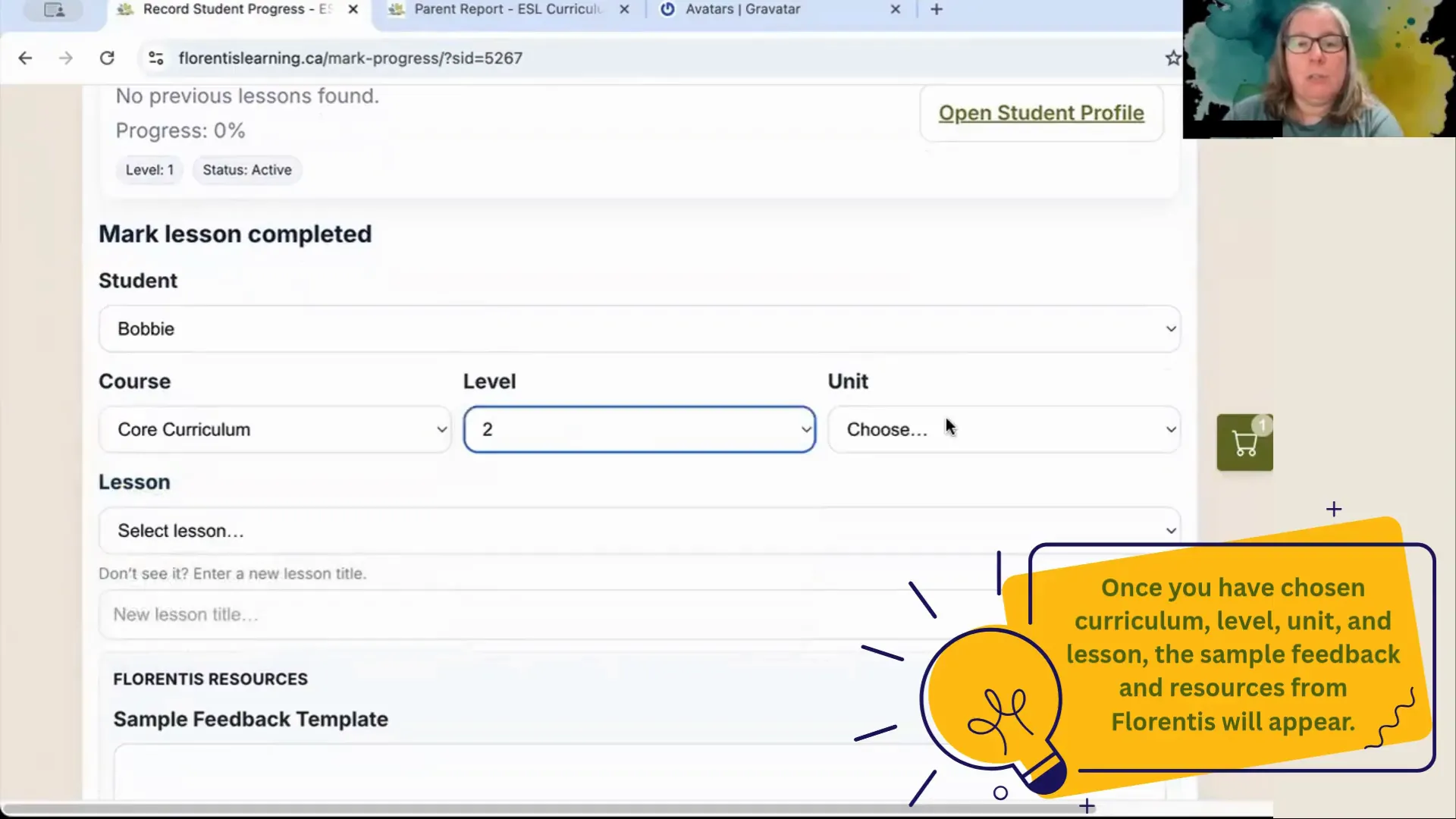
After saving, the student’s last-lesson date updates and the feedback appears on their profile. This makes keeping a continuous record effortless and gives parents a professional snapshot after every class.
Placement assessments and learning plans that actually help
The placement assessment workflow is one of the most powerful time-savers. Choose the assessment type, enter a raw score, then use the prefill button. The system will suggest a CEFR-based level, assign a core curriculum and course, and generate sample feedback you can edit.
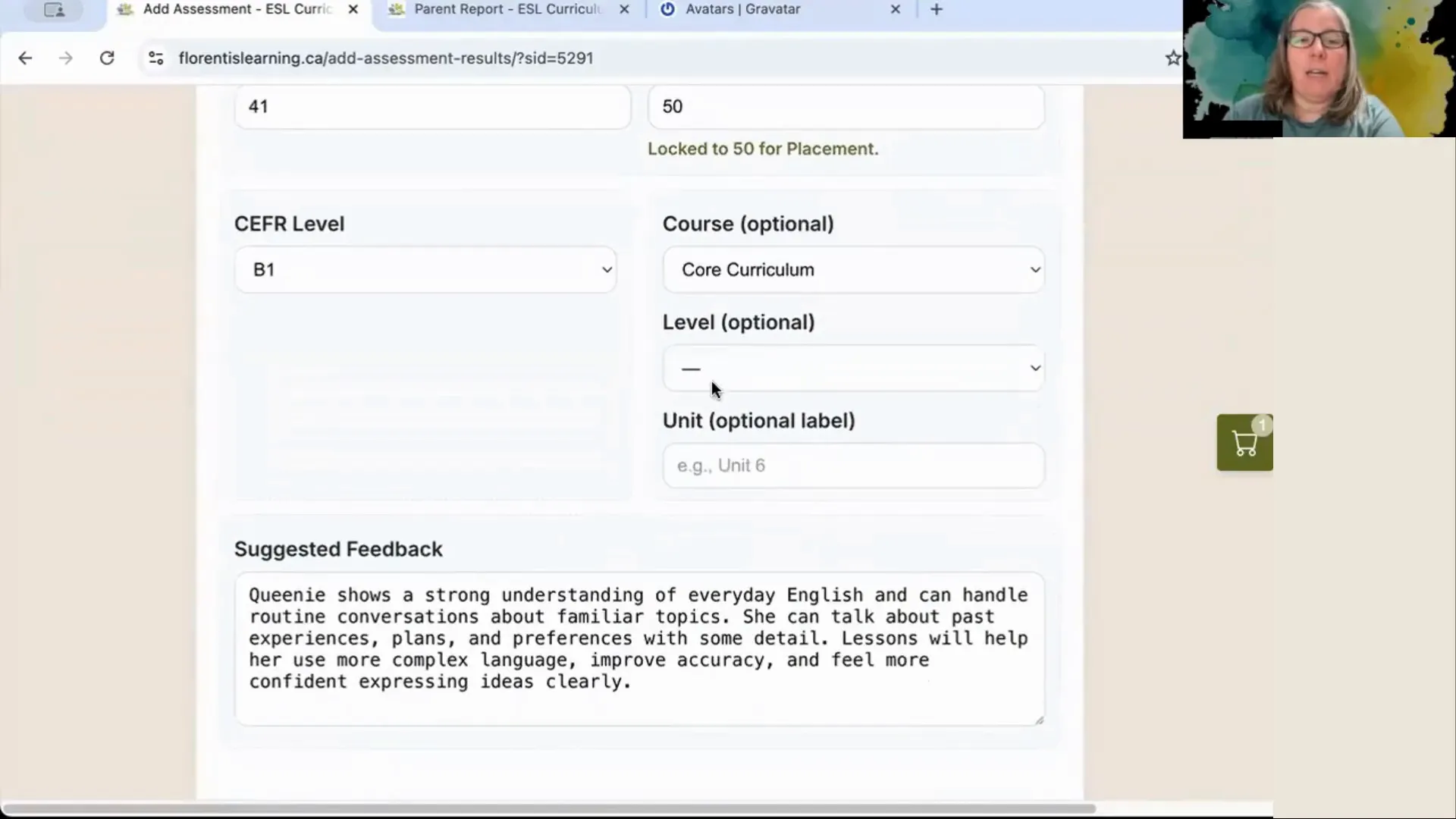
From the assessment you can build a learning plan in seconds. Pick short-term goals, long-term goals, class frequency, and curriculum focus (for example, test prep). The result is a clear, printable plan parents appreciate and which you can use to guide future lessons.
How automation saves you real time
The hub includes sensible defaults and templates so you spend less time typing and more time teaching. Prefilled comments and auto-linked resources mean you rarely start from scratch when logging a lesson. Teachers using the hub report doing multiple assessments in a single session without burnout.
Key automations to look for:
- Auto-populated course, unit, and level after assessment prefill
- Automatic resource attachments for each lesson
- Quick links to share a parent-friendly report without logins
Who benefits most
This approach fits teachers who run many one-to-one or small-group classes, especially those who need to keep parents informed. It is also helpful for teachers preparing learners for standardized exams and for those who want a single source of truth instead of multiple spreadsheets and messaging apps.
Pricing and special offer
The Teacher Hub is included free for founding members who join the Complete Classroom Curriculum before November 17. After that date the hub becomes a paid add-on. The membership provides access to hundreds of interactive ESL lessons spanning Pre A1 to B2 and includes future updates.
Deciding if this is the right tool
Ask yourself:
- Do I spend more time searching for records than preparing lessons?
- Would my parents appreciate regular, professional progress reports?
- Do I want a faster way to place students and generate learning plans?
If you answered yes to any of the above, a single dashboard that combines placement, lesson records, and parent reporting is likely to simplify your workflow and improve communication.
Frequently asked questions
How quickly can I add a new student to the hub?
A student can be added in a few seconds using just their name. Optional fields include age, native language, gender, and starting level. You can edit all details later.
How do parents view reports?
Each student has a shareable parent link that requires no login. The report shows assessment summary, recent lesson feedback, teacher contact, and a booking link when provided.
Can I attach lesson resources automatically?
Yes. When a lesson matches a curriculum item, flashcards, workbook pages, and games are auto-attached so parents have direct resources to support learning at home.
What does the placement assessment do?
Enter the assessment score, hit prefill, and the system will assign a CEFR level, the appropriate course and unit, and suggested feedback. You can then generate a learning plan based on that level.
Is there a free trial or founding member offer?
Founding members who join the Complete Classroom Curriculum before November 17 receive lifetime access to the Teacher Hub without extra cost. After the founding window closes, the hub will become a paid add-on.
Will this replace my current lesson notes and spreadsheets?
For many teachers it does. The hub centralizes lesson history, assessments, and parent communication, reducing the need for separate spreadsheets and multiple messaging threads.
Final note
The difference between chaos and calm in an online teaching schedule often comes down to how well you manage information. A purpose-built teacher hub that pre-fills levels, auto-links resources, and generates parent-friendly reports can turn repetitive admin into a one-click routine. If you want fewer tabs, fewer spreadsheets, and clearer communication with parents, adopting a single dashboard is one of the most effective online ESL teaching tools for teachers.
Leave a Reply